Spicetify patches the Spotify desktop app so you can change its theme, add extensions, and install custom apps from Marketplace. This guide covers current install commands, what to run after Spotify updates, and fixes for the errors people hit most often.
Before you install
1. Use the desktop installer when possible
Prerequisite
The Spotify installer from spotify.com is the most reliable path. The Spicetify FAQ recommends removing the Microsoft Store version and installing from spotify.com. Release notes say the Store build is supported, but you may need to run Spicetify every time you close it. If patching fails, uninstall the Store app and install from spotify.com instead.
2. Log into Spotify first
Prerequisite
Open Spotify and stay logged in for at least 60 seconds before your first Spicetify run. The tool needs Spotify to have generated its prefs file.
3. Desktop only
Prerequisite
Spicetify patches the desktop client on Windows, Mac, and Linux. There is no mobile version, and any app claiming otherwise is not Spicetify.
Install Spicetify
4. Windows
Install
Open PowerShell as your normal user and run:
iwr -useb https://raw.githubusercontent.com/spicetify/cli/main/install.ps1 | iexPackage managers also work: winget install Spicetify.Spicetify, scoop install spicetify-cli, or choco install spicetify-cli. Stick with one method for updates. Scoop users who installed Spotify through Scoop may need:
spicetify config spotify_path "C:\Users\<username>\scoop\apps\spotify\current"5. Mac
Install
Run the official script in Terminal:
curl -fsSL https://raw.githubusercontent.com/spicetify/cli/main/install.sh | shOr use Homebrew, then set the Spotify path (Homebrew does not do this for you):
brew install spicetify-cli
spicetify config spotify_path "/Applications/Spotify.app/Contents/Resources"
6. Linux
Install
The same curl script works on most distros:
curl -fsSL https://raw.githubusercontent.com/spicetify/cli/main/install.sh | shArch users can use the AUR (yay -S spicetify-cli). If spicetify apply fails with a permission error, run once:
sudo chmod a+wr /usr/share/spotify
sudo chmod a+wr /usr/share/spotify/Apps -R
Replace /usr/share/spotify with /opt/spotify if your distro uses that path. Snap and Flatpak builds need extra steps covered in the Spicetify docs.
First run and Marketplace
After installing, run spicetify backup apply. backup stores a clean copy of Spotify's files; apply patches the app and restarts it. A stock look after apply is normal until you pick a theme.
Install Marketplace if the installer did not already:
Windows (PowerShell)
iwr -useb https://raw.githubusercontent.com/spicetify/marketplace/main/resources/install.ps1 | iexMac and Linux
curl -fsSL https://raw.githubusercontent.com/spicetify/marketplace/main/resources/install.sh | shRestart Spotify and a Marketplace entry appears in the left sidebar.
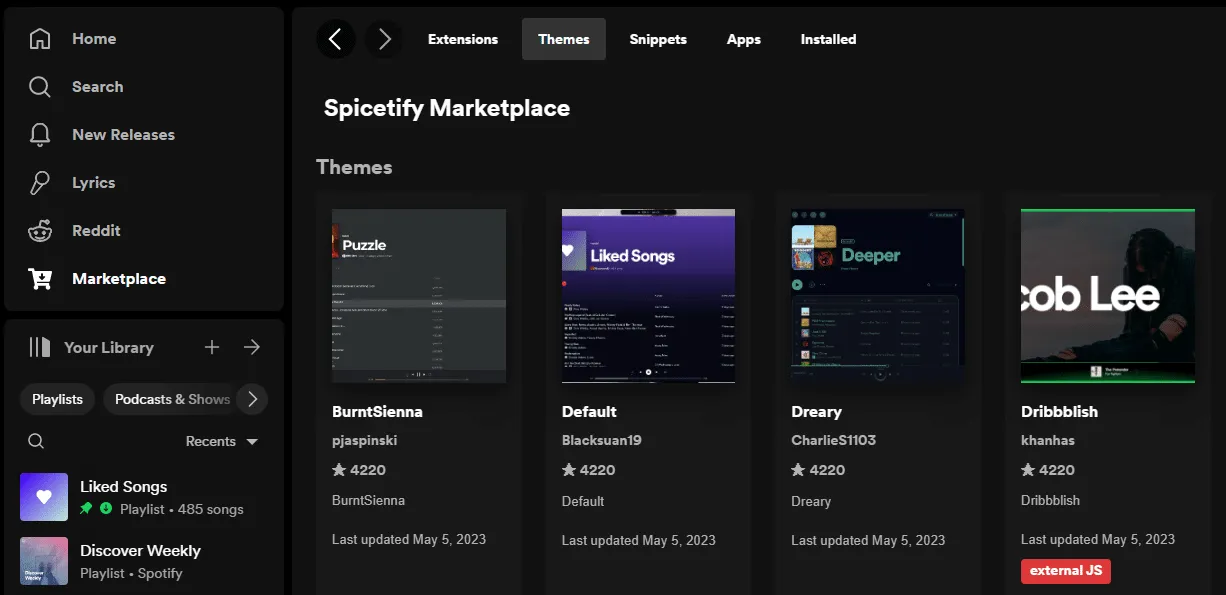
Marketplace has five tabs: Extensions (fullscreen, shuffle+, lyrics), Themes (Comfy, Dribbblish, Text, Catppuccin), Snippets (one-line CSS tweaks), Apps (sidebar pages like stats dashboards), and Installed (toggle or remove what you added). Click Install on anything and Marketplace applies it without terminal work.
For themes not on Marketplace, copy the theme folder into %appdata%\spicetify\Themes\ (Windows) or ~/.config/spicetify/Themes/ (Mac/Linux), then run:
spicetify config current_theme ThemeFolderName
spicetify config color_scheme SchemeName
spicetify apply
Run spicetify config-dir if you are unsure where your config lives.
After Spotify updates
Spotify updates replace patched files, so your theme disappears. Run spicetify backup apply. If that fails, run spicetify update; if you updated through a package manager or the update did not fully apply, run spicetify restore backup apply. Point your Spotify shortcut at spicetify auto to patch and launch in one step.
Update Spicetify itself with spicetify update, or through your package manager if you installed that way. Mixing install methods is the fastest way to end up with two copies fighting each other.
To remove Spicetify, run spicetify restore, then uninstall the CLI the way you installed it.
Troubleshooting
7. please manually set spotify path
Fix
Set the path explicitly. Windows: spicetify config spotify_path "C:\Users\<you>\AppData\Roaming\Spotify". Mac: spicetify config spotify_path "/Applications/Spotify.app/Contents/Resources". Linux: spicetify config spotify_path "/usr/share/spotify" or /opt/spotify.
8. cannot find pref_file
Fix
Open Spotify, log in, wait a minute, close it, and retry. If it still fails, set prefs_path manually: Windows uses C:\Users\<you>\AppData\Roaming\Spotify\prefs; Mac uses ~/Library/Application Support/Spotify/prefs; on Linux run find ~ -path "*/spotify/prefs" 2>/dev/null to locate the file.
9. Marketplace tab missing
Fix
Re-run the Marketplace install script for your OS, then spicetify apply. If the tab is still gone, run spicetify config custom_apps marketplace followed by spicetify apply.
Spicetify changes the desktop app's look and layout, and extensions can add behavior. It does not unlock Premium or remove ads. Stick to Marketplace unless you can read third-party theme code yourself.
For listening stats outside Spotify, see our guide to your Spotify stats. If you customize other desktop apps, our Rainmeter skins roundup covers similar visual tweaks on Windows.
Does Spicetify work with Spotify Free?
Can I use Spicetify on Android or iPhone?
Do I need to reinstall Spicetify when Spotify updates?
Which Spotify version do I need?
How do I make my own Spicetify theme?

Amit loves new tech and apps that make life easier, he writes about apps, games and useful websites on TheTechBasket.